Get your leads into Relay
Relay can only answer leads it can see. Set up your lead email once, share your Relay number, and add the rest by hand.
In short: Four ways to get leads into Relay Solo: customers text or call your Relay number, you forward lead emails from AutoTrader, CarGurus, or your dealer website, you add a lead yourself, or you forward a text lead.
Who this is for: New Relay Solo customers setting up where their leads come from.
Share your Relay number
Anyone who texts or calls your Relay number shows up in Relay as a lead. Put the number in your email signature, socials, business card, and listings.
- In the app, tap the yellow + button.
- Your Relay number is at the top. Tap Copy.
Forward your lead emails (do this once)
You have your own lead email address. It ends in @m.razzytech.com. Any lead email sent there, from AutoTrader, CarGurus, Facebook, or your dealer website, becomes a lead in Relay.
- On a computer, sign in at app.userelay.ca.
- Click Copy address.
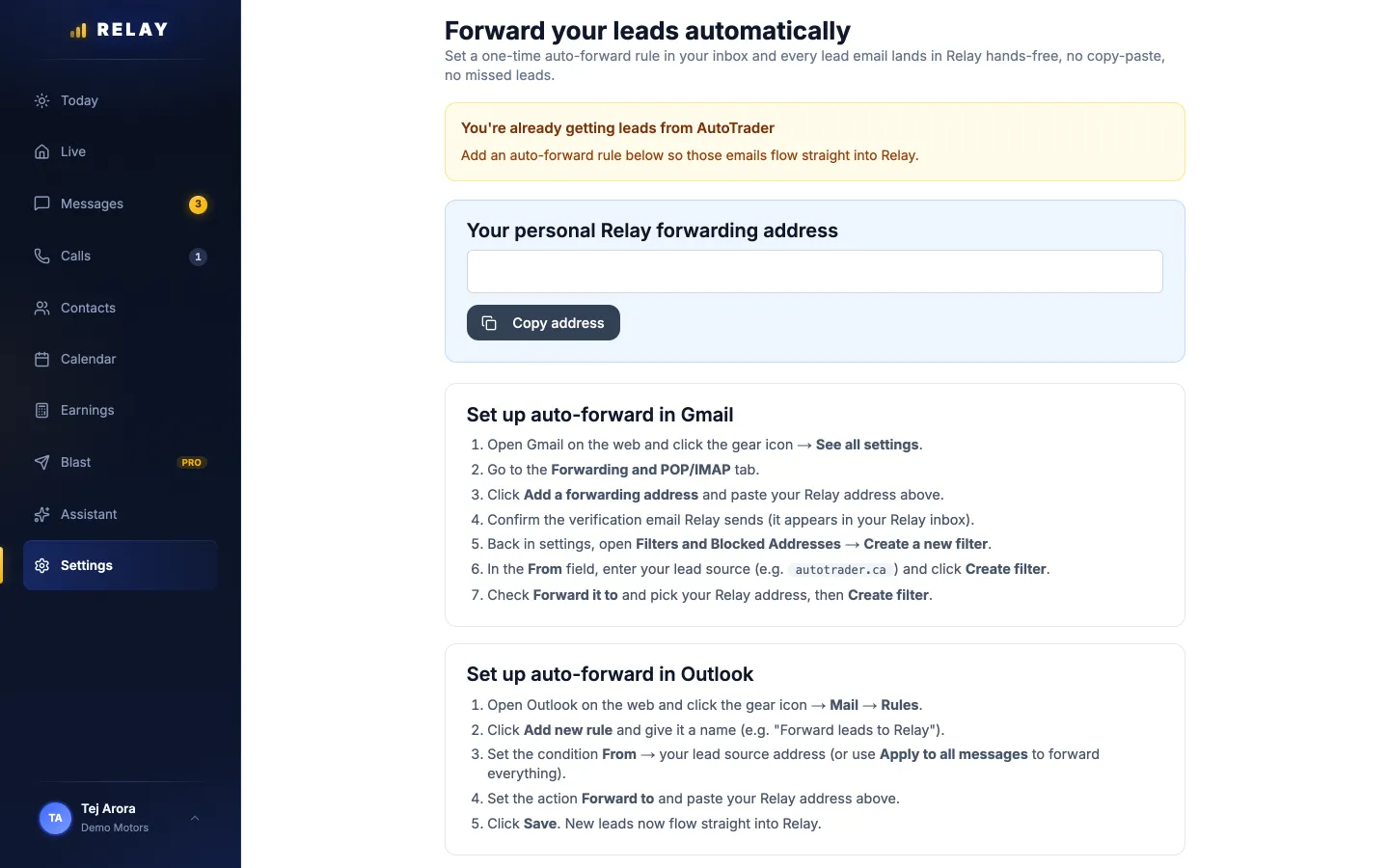
Settings, then Email Forwarding. Your own address appears in the box (hidden here). - Follow the Gmail or Outlook steps on that page. They set up a rule that forwards lead emails for you.
- Gmail sends a confirmation email first. It shows up in your Relay Messages. Open it and click the link.
Even easierIf a lead site lets you choose where leads are emailed, just give it your Relay address. You can also copy the address in the app: Settings, under Forward leads here.
What happens next: Relay makes the lead, sends you a notification, and sends your automatic first text if it is on (see AI replies).
Add a lead in the app
- Tap the yellow + button, then Add Lead.
- Paste the lead into Paste lead text and tap Parse. Or tap Upload a screenshot. Relay fills in the form.
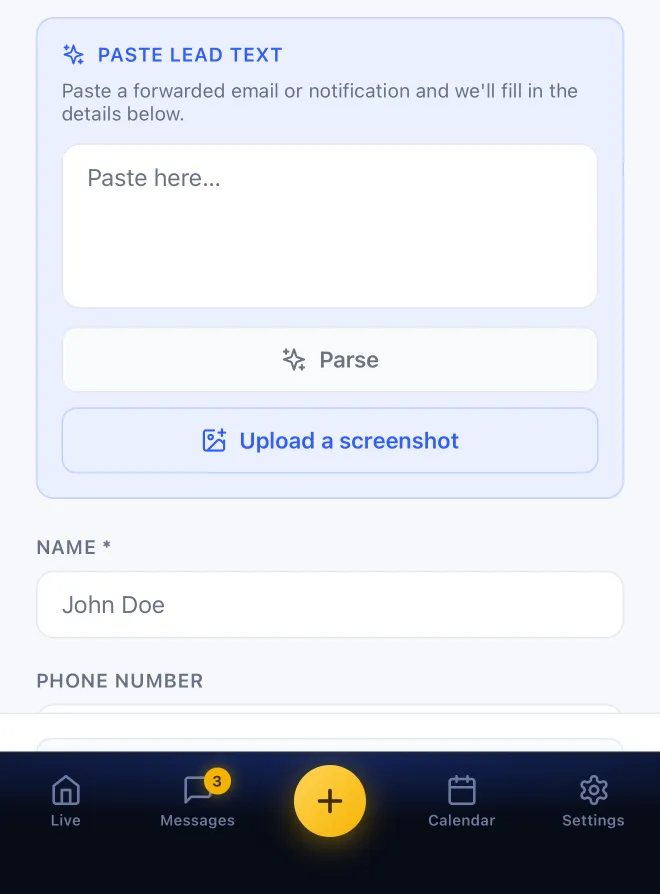
Add Lead: paste a lead or upload a screenshot and Relay fills in the details. - Check the name, phone, and vehicle.
- Want Relay to text them now? Turn on Text them now. Leave it off to text them yourself.
- Tap Create Lead.
Add a lead on a computer
- In Messages, click New, then New lead.
- Paste the lead or upload a screenshot. Click Auto-fill.
- Check the details.
- Want Relay to text them now? Turn on Send the automatic first text. Leave it off to text them yourself.
- Click Create Lead.
Forward a text lead to your Relay number
Got a lead by text on your own cell? Forward that text to your Relay number. Relay reads it and makes the lead.
This only works from the cell number Relay has on file. To set it, on a computer go to Settings, then Lead Source Numbers. Under Your phone number, type your cell with +1 in front, then click Save.
Leads that arrive by text from a lead service
Some lead services send leads as texts. Add their number and every text from it becomes a lead.
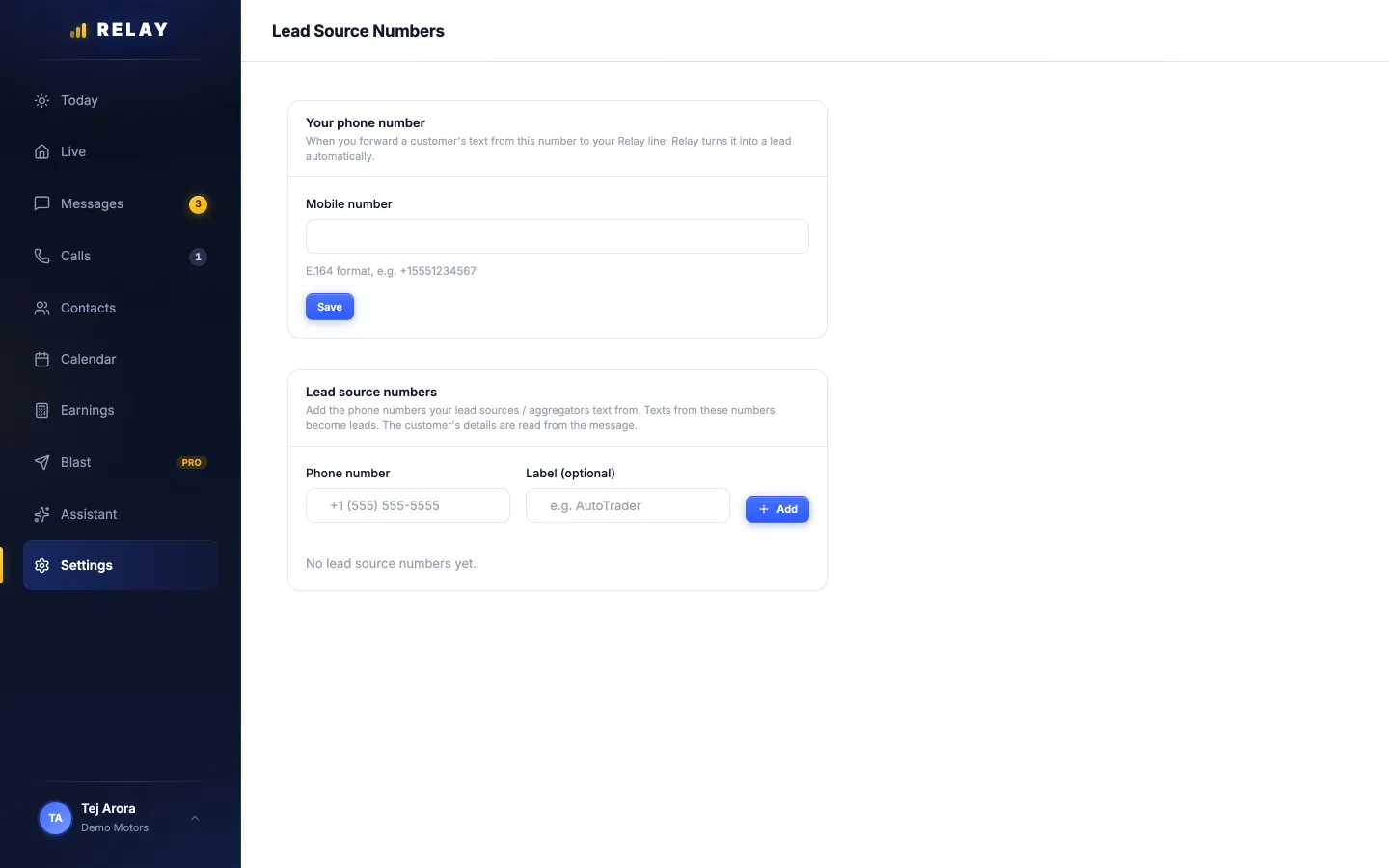
Settings, then Lead Source Numbers. - Under Lead source numbers, type the number the service texts from. Click Add.
Bring in past customers
Import a spreadsheet or your phone contacts. Nobody gets a text. See Import your contacts.
Common questions
How do leads get into Relay Solo?
Customers text or call your Relay number, you forward lead emails to your Relay lead address, or you add a lead yourself by pasting it, uploading a screenshot, or importing contacts.
Does Relay Solo work with AutoTrader and CarGurus leads?
Yes. Forward their lead emails to your Relay lead address (it ends in @m.razzytech.com), or set that address as the lead email on the site. Relay reads normal lead emails and ADF, the lead format most car sites use.
Where do I find my Relay lead email address?
In the app: Settings, under Forward leads here. On a computer: Settings, then Email Forwarding.
Does a lead I add myself get a text right away?
Only if you turn it on. In the app the switch is Text them now. On a computer it is Send the automatic first text. Both start off.
I set up forwarding but no leads show up. What now?
Make sure you clicked the confirmation link Gmail sends, and that your rule matches the sender of your lead emails. Then send yourself a test lead. Still stuck? Text us at (778) 764-1975.